If there is a template you are not going to use, you can delete it at any time.
To delete a Field Ticket template:
- Open the Field Ticket form. For details, refer to Opening Blank Field Ticket Forms, page 1.
A Field Ticket pop-up window opens, offering the option to Create a new Field Ticket or to Create Field Ticket from Template.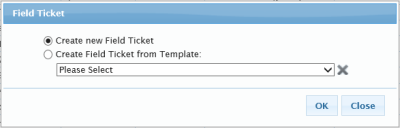
- Select the template you want to delete from the Create Field Ticket from Template drop-down menu.
- Click the "X" button to the right of the drop-down menu.
- Click OK.
A Delete Field Ticket Template warning pop-up appears.
- Click OK.
The template is deleted.